
Connect NVIDIA Auto Ontology to ModelGo: Setup & Troubleshooting
NVIDIA Auto Ontology builds a semantic layer from database metadata, translates natural-language questions into SQL, and returns the answer, generated SQL, and processing steps. This guide uses ModelGo for reasoning and entity extraction while keeping NVIDIA services for embeddings and reranking.
Architecture
Auto Ontology combines a web UI, a Text-to-SQL backend, a data-ingestion service, and PostgreSQL with pgvector. Models participate in terminology extraction, candidate selection, SQL generation, validation, and repair.
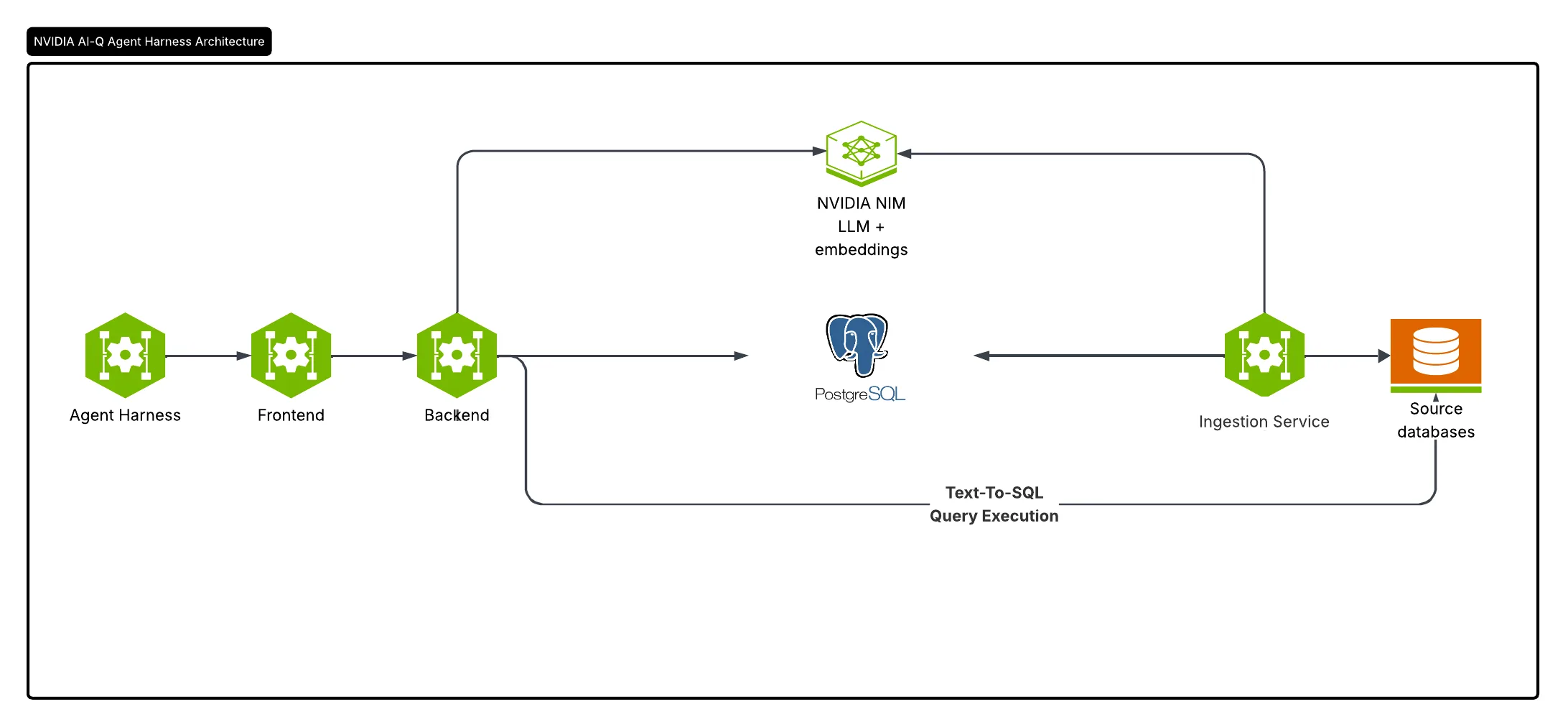
After completing this guide, the model roles are routed as follows:
| Auto Ontology role | Purpose | Service used in this guide |
|---|---|---|
REASONING | Semantic compilation, SQL generation, explanations, and answerability checks | ModelGo Chat Completions |
NON_REASONING | Intent detection, entity extraction, candidate selection, and SQL checks | ModelGo Chat Completions |
EMBED | Generate vectors for tables, columns, terms, and SQL properties | NVIDIA Embeddings |
RERANK | Rerank candidate data | NVIDIA Rerank |
Prerequisites
Prepare the following:
- Docker and Docker Compose v2;
- Python 3.12+ and uv;
- a ModelGo API Key created in the ModelGo console;
- an NVIDIA API Key for embeddings and reranking;
- at least 16 GB of available memory and a PostgreSQL database for testing.
This guide targets Auto Ontology commit fc43a826 (project version 1.2.0). If you use a newer upstream version, compare its .env.example and auto_ontology/utils/llm_invoke.py before applying the changes below.
1. Select and validate a ModelGo model
In the Model Plaza, choose a text model that supports OpenAI Chat Completions and copy the API ID shown on its card. The display name and API ID may differ; use the API ID in your configuration.
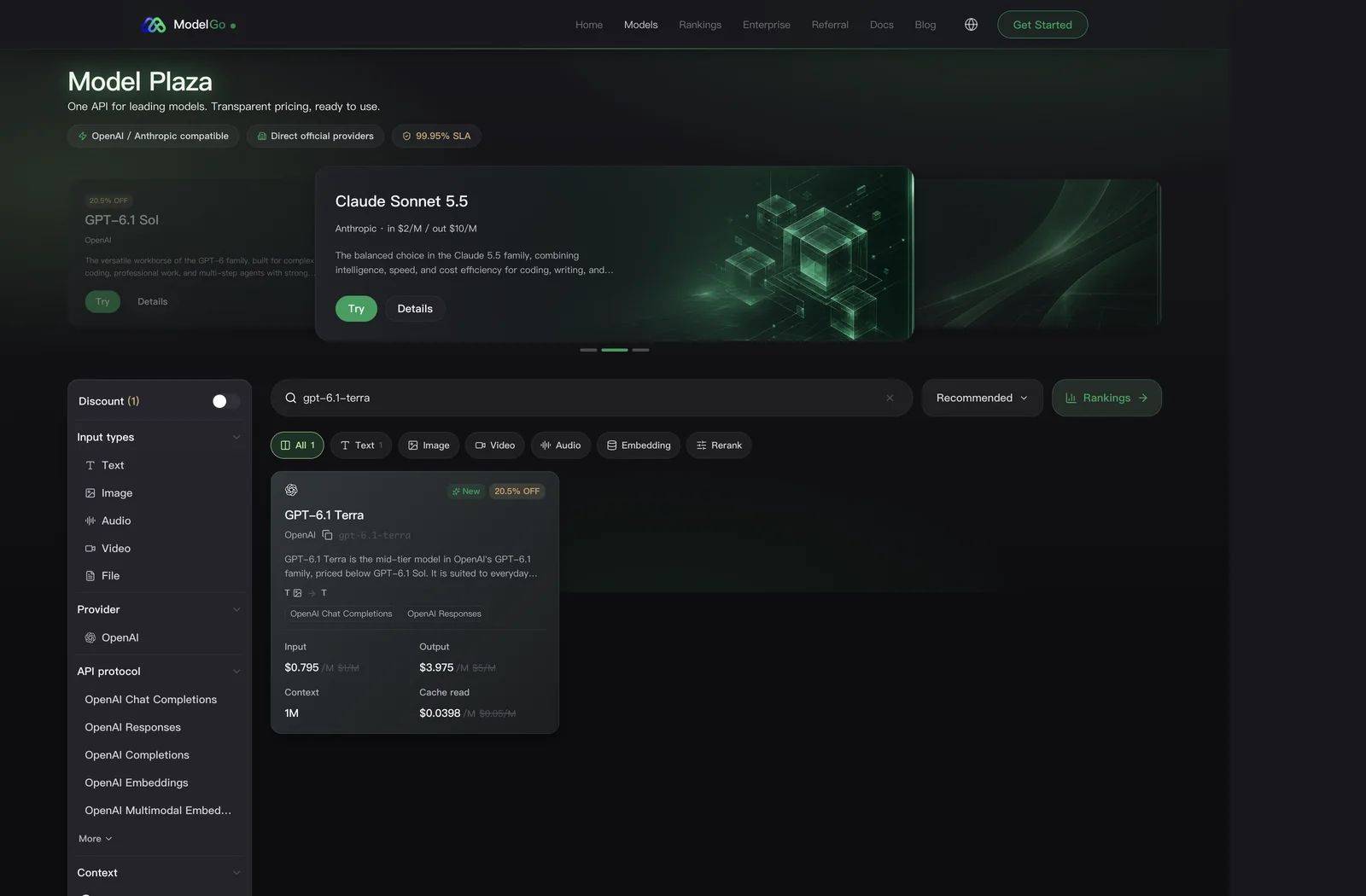
First, list the models available to your API Key:
export MODELGO_API_KEY="mgk_your_api_key"

curl https://api.modelgo.ai/v1/models \
  -H "Authorization: Bearer $MODELGO_API_KEY"
Then make a non-streaming request with the model you plan to use. Replace <model> with a logical model ID returned by the previous request:
curl https://api.modelgo.ai/v1/chat/completions \
  -H "Authorization: Bearer $MODELGO_API_KEY" \
  -H "Content-Type: application/json" \
  -d '{
    "model": "<model>",
    "messages": [
      {"role": "user", "content": "Return JSON only: {\"ready\":true}"}
    ],
    "response_format": {
      "type": "json_schema",
      "json_schema": {
        "name": "readiness",
        "strict": true,
        "schema": {
          "type": "object",
          "properties": {"ready": {"type": "boolean"}},
          "required": ["ready"],
          "additionalProperties": false
        }
      }
    },
    "max_tokens": 128
  }'
Auto Ontology relies heavily on JSON Schema structured output. If ordinary chat works but this request fails, do not continue with the deployment. Check response_format support on the model parameter page or select another model.
2. Download Auto Ontology
git clone https://github.com/NVIDIA/auto-ontology.git
cd auto-ontology
git checkout fc43a82600e18b19d159c52023f54f5572f537ac
cp .env.example .env
This commit matches the configuration and screenshots used in this guide. For production, you may upgrade to a newer commit after testing it, but avoid tracking a floating main branch indefinitely.
3. Route ModelGo through the OpenAI client
Auto Ontology 1.2.0 selects its chat client from the model-name prefix. Only names beginning with openai/, azure/, or aws/ use ChatOpenAI; other names use ChatNVIDIA. ModelGo logical model IDs usually do not have those prefixes, so the client selection also needs to recognize the ModelGo endpoint.
Edit auto_ontology/utils/llm_invoke.py:
- Add this import:
``python from urllib.parse import urlparse ``
- In
_build_client, replace the original check:
``python if model.startswith(("openai/", "azure/", "aws/")): ``
with:
```python endpoint_host = (urlparse(base_url).hostname or "").lower() is_modelgo = endpoint_host in {"api.modelgo.com", "api.modelgo.ai"}
if is_modelgo or model.startswith(("openai/", "azure/", "aws/")): ```
This change only affects client selection; it does not log or forward additional credentials. Check the syntax after editing:
uv run python -m py_compile auto_ontology/utils/llm_invoke.pySkip this section if your newer Auto Ontology version already selects an OpenAI-compatible client from the endpoint.
4. Configure the four model roles
Edit .env. The following configuration sends reasoning tasks to ModelGo and retains NVIDIA for embeddings and reranking. Replace every placeholder with a real value:
# ModelGo: reasoning and fast text tasks
REASONING_ENDPOINT=https://api.modelgo.ai/v1
REASONING_API_KEY=mgk_your_api_key
REASONING_MODEL=<reasoning_model>

NON_REASONING_ENDPOINT=https://api.modelgo.ai/v1
NON_REASONING_API_KEY=mgk_your_api_key
NON_REASONING_MODEL=<non_reasoning_model>

# NVIDIA: embeddings
EMBED_ENDPOINT=https://integrate.api.nvidia.com/v1
EMBED_API_KEY=nvapi_your_api_key
EMBED_MODEL=nvidia/nemotron-3.5-embed-1b

# NVIDIA: reranking
RERANK_ENDPOINT=https://ai.api.nvidia.com/v1/retrieval/nvidia/nemotron-3.5-rerank-8b/reranking
RERANK_API_KEY=nvapi_your_api_key
RERANK_MODEL=nvidia/nemotron-3.5-rerank-8b
Start with the same validated model for REASONING and NON_REASONING. After the full workflow is stable, you can move NON_REASONING_MODEL to a faster, less expensive model that still supports structured output.
:::warning
- Set the endpoint to
https://api.modelgo.ai/v1; do not append/chat/completions. - Use the ModelGo logical model ID without adding an
openai/prefix. .envcontains plaintext credentials. Do not commit it or include terminals and editors showing API Keys in screenshots.- Ingestion and querying must use the same embedding model. Rebuild all vectors after changing it.
:::
5. Configure the database and local account
Continue editing .env. This example uses the official Wide World Importers sample database:
POSTGRES_HOST=localhost
POSTGRES_PORT=5432
POSTGRES_USER=postgres
POSTGRES_PASSWORD=<new_postgres_password>
POSTGRES_DATABASE=auto_ontology

CONNECTION_STRINGS=postgresql://postgres:<new_postgres_password>@postgres:5432/wideworldimporters

AUTH_SECRET=<long_random_string>
APP_URL=http://localhost:3000
AUTO_ONTOLOGY_ADMIN_EMAIL=admin@example.com
AUTO_ONTOLOGY_ADMIN_PASSWORD=<new_admin_password>
PGADMIN_EMAIL=admin@example.com
PGADMIN_PASSWORD=<new_pgadmin_password>
Generate AUTH_SECRET:
openssl rand -base64 32Start PostgreSQL and load the official sample data:
docker compose up -d --wait postgres

git clone https://github.com/NVIDIA/auto-ontology-eval.git ../auto-ontology-eval
(cd ../auto-ontology-eval && \
  uv sync && \
  cp .env.example .env && \
  POSTGRES_PASSWORD='<new_postgres_password>' \
  uv run python scripts/seed/seed_wwi.py \
    --database-name wideworldimporters --drop)
6. Start Auto Ontology and run semantic compilation
docker compose up -d --build
docker compose ps
Open http://localhost:3000 and sign in with the administrator account from .env. Go to Settings → Semantic Compilation, enable semantic compilation, and wait for Semantic compilation is ready.
Initial ingestion and compilation can generate many model requests. If you receive 429 or 503 responses, reduce concurrency:
LLM_MAX_INFLIGHT=2Restart the Auto Ontology services and try again. Do not use unlimited retries to hide model-permission, parameter, or endpoint errors.
7. Ask a question and inspect the result
In Chat, begin with a question that the sample database can answer:
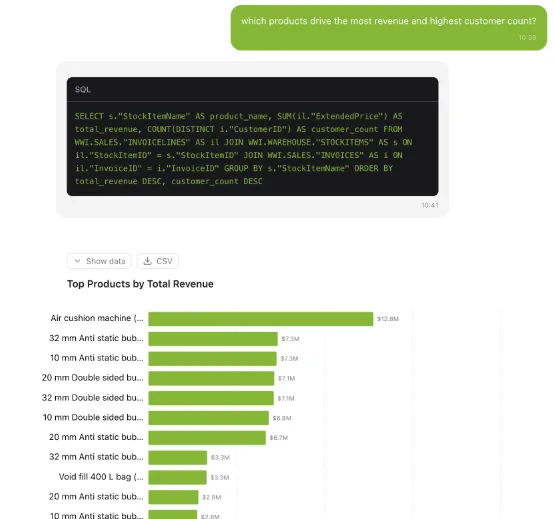
Which products drive the most revenue and highest customer count?
A successful result should include:
- a natural-language answer;
- the SQL that was executed;
- query data or a chart;
- terminology resolution, table relationships, and validation steps.
Also inspect the request logs in the ModelGo console. Confirm that requests use the configured logical model, then review status codes, latency, and token usage. If a simple curl request works but semantic compilation fails, check structured output and tool-calling support first.
Troubleshooting
- Requests still go to an NVIDIA chat model: confirm that
REASONING_ENDPOINTandNON_REASONING_ENDPOINTare set, apply the client-selection change from section 3, and rebuild the image instead of only restarting an old container. 401: verify the completemgk_API Key and make sure.envdid not add quotes, spaces, or line breaks.403or model unavailable: callGET /v1/modelsand confirm that the API Key can access the configured logical model.404: the ModelGo endpoint must behttps://api.modelgo.ai/v1, not the complete/chat/completionsURL.- Repeated structured-output validation failures: choose a model with
response_formator tool-calling support. A successful plain-text response is not sufficient for Auto Ontology. - Embedding returns
unsupported_parameter: this guide does not route embeddings through ModelGo. Confirm thatEMBED_ENDPOINTstill points to the selected embedding provider. - Retrieval quality drops or pgvector reports a dimension mismatch: ingestion and querying used different embedding models. Restore the previous model or clear the old vectors and run a complete ingestion again.
- Usage is higher than expected: semantic compilation processes tables and columns in parallel. Begin with a smaller database and a lower
LLM_MAX_INFLIGHT, then scale after the full workflow is stable.
Next steps
- Add your PostgreSQL, MySQL, Snowflake, ClickHouse, or another supported data source to
CONNECTION_STRINGS. - Select a less expensive structured-output model for
NON_REASONING. - Use the Auto Ontology MCP Server to expose semantic-layer-constrained analytics to an Agent.
- Monitor usage and errors by API Key or project in the ModelGo console, then establish production concurrency and budget limits.